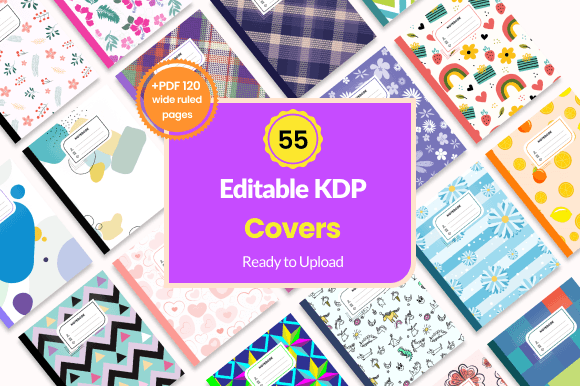
The Ultimate Guide to Editable Notebook Covers for Amazon KDP Success
For anyone diving into the world of self-publishing on Amazon Kindle Direct Publishing (KDP), low-content books like journals, notebooks, and planners offer a fantastic entry point. They are popular, in constant demand, and can be produced relatively quickly. But the single most critical element determining their success in a crowded marketplace is the cover. A compelling, professional-looking notebook cover grabs attention, communicates quality, and ultimately drives sales. This is where a collection of editable notebook covers becomes not just a tool, but a powerful business asset.
Why Your Notebook Cover Is Your Most Important Sales Tool
On Amazon, customers scroll through hundreds of options. Your notebook cover is the first and often only visual they will judge before clicking. A generic, poorly designed cover suggests a generic, poorly considered product inside. Conversely, a stunning, well-crafted cover implies value, care, and relevance. It answers the customer’s immediate question: “Is this for me?”
Think about the niches: a vibrant, playful cover for a kids’ journal; a clean, elegant design for a professional diary; a warm, rustic pattern for a family cookbook. Each cover must speak directly to its intended audience. Creating these individually from scratch requires significant design skill, time, and resources. This is the fundamental problem that editable notebook cover templates solve.
Unlocking Efficiency with 55 Ready-to-Edit Designs
A bundle of 55 editable notebook covers is like having a complete design studio at your fingertips. Instead of starting from a blank canvas for every new low-content book idea, you start from a proven, professionally created foundation. Each template acts as a flexible blueprint. The core concept is simple: you get a beautiful base design that you can adapt, tweak, and personalize to create a unique product that fits your specific market.
The editable nature is key. You can change patterns, swap colors, adjust the layout style, and modify text elements. This means one template can spawn dozens of distinct-looking notebooks. For example, a geometric pattern template could be colored in soft pastels for a baby journal, bold primaries for a school composition notebook, or muted earth tones for a travel diary. The versatility is immense, allowing you to rapidly test different aesthetics and cater to various sub-niches without reinventing the wheel each time.
What Makes a Great Editable Notebook Cover Bundle?
When evaluating a set of editable notebook covers, several practical features stand out as essential for a smooth KDP publishing workflow.
- True Editability: The files should be provided in formats like AI (Adobe Illustrator), EPS, and PSD (Adobe Photoshop). These are industry-standard formats that allow deep editing in professional design software, giving you control over every element, from the background pattern to the font style.
- Ready-to-Use Elements: Included PNG files are crucial. They offer a high-quality, pre-rendered image of the cover that you can upload directly to KDP if you choose not to edit, or use as a reference.
- Complete Interior File: A bundle that includes a PDF with 120 wide-ruled pages, ready to upload, is incredibly valuable. It ensures your book has a professionally formatted interior that matches the standard expectations for a notebook, saving you yet another design task.
- Flexible Size: The noted size of 7.5″ x 9.25″ is a popular trim size for notebooks, but the ability to change this size within the editable files is vital. Amazon KDP supports multiple trim sizes, and you may want to offer a 6″ x 9″ journal or an 8.5″ x 11″ composition book. Flexible templates accommodate this business decision.
Having all these components – the editable cover sources, the ready PNGs, and the interior PDF – in one package streamlines the entire process from concept to live product on Amazon.
Fitting Editable Covers into Your KDP Publishing Flow
Imagine your workflow with these assets. You identify a potential market—perhaps gratitude journals for adults. You browse your collection of 55 editable notebook covers and select a template with a serene, sophisticated pattern. Using your design software, you edit the color palette to calming blues and greens, adjust the title text to “Gratitude Journal,” and perhaps add a subtle subtitle. You then pair this edited cover with the provided 120-page wide-ruled PDF. Within an hour, you have a complete, market-ready book file ready for upload to KDP.
Next, you spot an opportunity for colorful homework notebooks for middle schoolers. You return to the same template bundle, choose a different cover design with more dynamic shapes, edit it using bright, energetic colors like red and yellow, change the title to “My Homework Notebook,” and again use the same reliable interior PDF. You’ve created a second, distinctly different product without designing a new interior or sourcing a new cover concept. This scalable approach is how successful KDP publishers build extensive catalogs.
The Practical Benefits: Time, Cost, and Consistency
The benefits are profoundly practical. First, time savings are astronomical. Designing one professional cover can take hours. With 55 starting points, you eliminate that initial creative bottleneck. Second, it reduces cost. Hiring a designer for multiple unique covers is expensive. These templates give you the tools to produce high-quality work yourself, even with moderate design skills. Third, it ensures brand consistency. If you’re building a series of journals (e.g., a “Mindfulness Series”), you can use similar template styles with coordinated color changes, creating a cohesive product line that customers recognize and trust.
This approach also lowers the risk of experimentation. Trying out a new niche is less daunting when you know you have 55 design options to quickly adapt. If a particular notebook theme doesn’t sell well, you can pivot rapidly by editing a new cover and targeting a different audience, all while using the same dependable interior pages.
Key Considerations Before You Start
While editable notebook cover bundles are powerful, success depends on how you use them. It’s not about simply uploading 55 slightly different covers. It’s about strategic adaptation.
- Market Research: Always start with Amazon. See what’s selling in your chosen low-content category. What colors and styles are prevalent in the top-ranking journals or cookbooks? Use your editable covers to match those successful trends while adding your unique twist.
- Niche Targeting: Don’t just make a “notebook.” Make a “Plant Care Journal,” a “Camping Trip Planner,” or a “Baby’s First Year Memory Book.” Use the editability of your notebook covers to create designs that speak directly to these specific, passionate audiences.
- Technical Know-How: You will need basic proficiency with software like Adobe Illustrator, Photoshop, or a comparable program that can edit AI, EPS, or PSD files. The learning curve is manageable, and the investment in this skill pays off across all your KDP projects.
- Quality Final Check: After editing, always review your cover at the full size. Check that text is clear and readable in the Amazon thumbnail preview. Ensure colors are appealing and patterns look professional at the final resolution.
Remember, the interior is just as important. The included 120-page wide-ruled PDF is a standardized, user-friendly format. For many niches, this is perfect. However, for some specialized journals, you might later want to create custom interiors with prompts or layouts. The cover templates remain your constant, reusable asset for those future projects as well.
From Template to Unique Product: The Creative Process
The magic happens in the edit. Let’s walk through a scenario. You choose an editable notebook cover with a floral pattern. For a wedding planning journal, you might edit it to use soft blush pink and gold colors, making it elegant and romantic. For a garden logbook, you could change those same flowers to vibrant greens and earthy browns. The underlying template is identical, but the final products feel completely distinct and purpose-built. This is how you maximize the value of a single bundle. You aren’t just getting 55 covers; you’re getting the potential for hundreds of customized notebook covers, each tailored to capture a specific customer’s interest.
In the fast-paced, competitive environment of Amazon KDP, speed, quality, and adaptability are your greatest advantages. A comprehensive set of editable notebook covers provides all three. It empowers you to publish professional low-content books faster, target more niches effectively, and build a publishing business that is both creative and systematically efficient. The cover is the face of your product; make sure it has the flexibility to wear many different, successful smiles.