The Summer Activity Book Kids Interior: A Guide to Avoiding Common Publisher Pitfalls
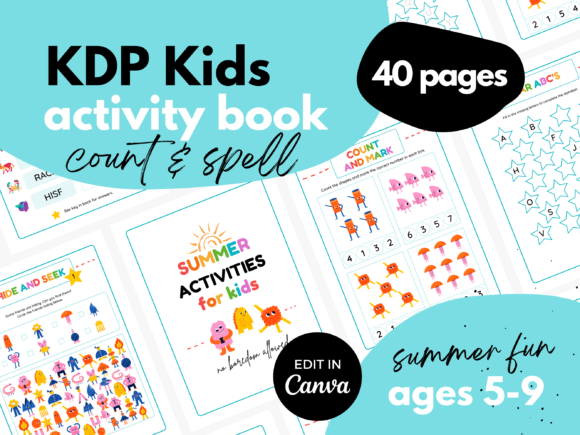
For anyone creating a children’s activity book for Amazon KDP, the decision of what interior to use is critical. A product like the KDP Kids Interior ⋆ Summer Activity Book represents a significant shortcut, offering a professionally designed, colorful template packed with engaging puzzles. Its promise is compelling: kids happily learning through games while you, the publisher, save countless hours of design work. However, simply downloading a template isn't a guarantee of success. Many creators, especially enthusiastic beginners, overlook key details that can turn a promising project into a disappointing one.
The Overlooked Detail: Purpose Versus Presentation
A common initial mistake is to focus solely on the vibrant aesthetics. The template is undeniably fun, with cute animals and a summer theme. The immediate reaction is often, “This looks great, kids will love it!” While true, this overlooks the core purpose: learning reinforcement. The interior includes activities like Counting, Word Search, and Shadow Matching, which are designed to develop specific skills. If you, as the publisher, don't briefly consider the age range and educational stage these activities target, you might market the book incorrectly. A word scramble suitable for a 7-year-old could frustrate a 5-year-old, even if the graphics are adorable.
Practical Advice: Before finalizing your book title and description on KDP, map each activity in the template to a simple learning objective. For example, “Shadow Matching develops visual discrimination and object recognition.” This not only helps you market the book more effectively to parents and educators but also ensures you’re using the template’s educational value fully, which increases customer satisfaction and reduces the chance of negative reviews.
Misunderstanding the “No Bleed” Specification
The product details clearly state Premium Color ⋆ No Bleed. For newcomers, “No Bleed” can be a confusing technical point that is often glossed over. A bleed is where design elements extend past the page’s trim edge to ensure no white borders after cutting. “No Bleed” means this template is designed for the standard paperback interior where all content is safely within the margins. The mistake here is assuming you can freely resize or move elements around in Canva without consequence.
If you decide to add a border or enlarge a cute animal graphic so it touches the edge of the canvas in Canva, you risk that element being awkwardly trimmed in the final printed book. This affects the professional quality of your product. The better approach is to respect the template’s original layout and use Canva’s tools to edit within the clearly defined content area, keeping all backgrounds and key artwork central.
The Canva Free Version: Capabilities and Limitations
It's a major benefit that the template requires only the free version of Canva. However, a frequent oversight is not understanding what the free version cannot do that might affect your edits. The free version has a vast library, but some users mistakenly try to replace template graphics with premium, Pro-only elements. When they realize those elements are locked, they might make a poor substitution with a low-quality or mismatched image, harming the cohesive, colorful look.
A better method: Before you start editing, spend ten minutes exploring the free Canva elements library. Search for “summer,” “animals,” “kids patterns” to see what’s available. Use only these to make any substitutions or additions. This ensures your modifications remain seamless and keep the book’s overall aesthetic intact. Also, remember the template is 40 pages; the free Canva account allows you to handle this length easily, but be mindful of organizing your project to avoid a cluttered workspace.
Page Count and Activity Balance
The template offers 40 pages, which is a robust length for a children’s activity book. A subtle error is not reviewing the balance of activity types across those pages. While the product lists inclusions like Word Search and Hide and Seek, the actual distribution matters. You might receive a template with ten counting pages, five word searches, and five shadow matching activities, for example. If your target audience loves puzzles, you might want to adjust the balance.
Since you receive a PDF with a link to the editable Canva template, the first step after accessing it should be a quick scan of all 40 pages. Make a simple list: how many of each activity type are there? Does this mix align with your book’s intended focus? Canva allows you to duplicate pages or swap pages within the template. You could, perhaps, duplicate a popular word scramble page and replace a less relevant activity, maintaining the total page count. This proactive review prevents publishing a book that feels repetitive or skewed in content.
Assuming Compatibility Means No Adjustment
The note Works for Paperback Hard Cover is important. Yet, a frequent misunderstanding is that “works for” means “optimized for.” Paperback and hardcover interiors on KDP can have slightly different specifications regarding margin expectations and spine calculation. The template, designed for 8.5x11 in with no bleed, works for both, but when you choose a hardcover binding during KDP setup, you must still input the correct interior file and ensure your cover designer accounts for the spine width based on 40 pages.
This is a technical but crucial step. The practical advice is to treat the interior template as your constant, and then adapt your cover creation process separately. Do not assume the template automatically adjusts for hardcover spine calculations; it doesn’t. Use KDP’s cover calculator tools, inputting 40 pages and your paper type, to generate the correct spine dimensions for your cover design. This avoids the painful scenario of a beautifully designed interior paired with a cover whose text is misaligned on the spine.
Final Checks Before Publication
Before hitting publish, a few constructive checks can save you from common pitfalls. First, proofread all text you’ve added. The template includes activity frameworks, but you likely add words to searches or scrambles. A spelling error in a child’s puzzle is a glaring quality issue. Second, do a final print preview. Use Canva’s download as a PDF feature and view it as a continuous document. Look for any accidental layout shifts, inconsistent font sizes, or elements that seem too close to the edge. Third, verify your KDP listing description accurately reflects the activities inside. Mentioning specific games like “Shadow Matching” and “Hide and Seek” attracts the right customers and builds trust.
Products like the KDP Kids Interior ⋆ Summer Activity Book are fantastic resources that democratize quality publishing. By approaching them with a mindful, detail-oriented strategy—respecting their design parameters, understanding their educational value, and double-checking technical compatibility—you move from simply using a template to mastering it. This leads to a polished, professional book that truly keeps kids learning and customers happy, fulfilling the promising potential of your publishing project.